Documentation Index
Fetch the complete documentation index at: https://docs.composo.ai/llms.txt
Use this file to discover all available pages before exploring further.
This guide shows how to integrate Composo’s deterministic evaluation with Langfuse’s observability platform to evaluate your LLM applications with confidence.
Overview
Langfuse provides comprehensive observability for LLM applications with tracing, debugging, and dataset management capabilities. Composo delivers deterministic, accurate evaluation through purpose-built generative reward models that achieve 92% accuracy (vs 72% for LLM-as-judge).
Together, they enable you to:
- ✅ Track every LLM interaction through Langfuse’s tracing
- ✅ Add deterministic evaluation scores to your traces
- ✅ Evaluate datasets programmatically with reliable metrics
- ✅ Ship AI features with confidence using quantitative, trustworthy metrics
Prerequisites
pip install langfuse composo
import os
from langfuse import Langfuse, get_client
from composo import Composo, AsyncComposo
# Set your API keys
os.environ["LANGFUSE_PUBLIC_KEY"] = "your-public-key"
os.environ["LANGFUSE_SECRET_KEY"] = "your-secret-key"
os.environ["COMPOSO_API_KEY"] = "your-composo-key"
# Initialize clients
langfuse = get_client()
composo_client = Composo()
async_composo = AsyncComposo()
How Langfuse & Composo work in combination
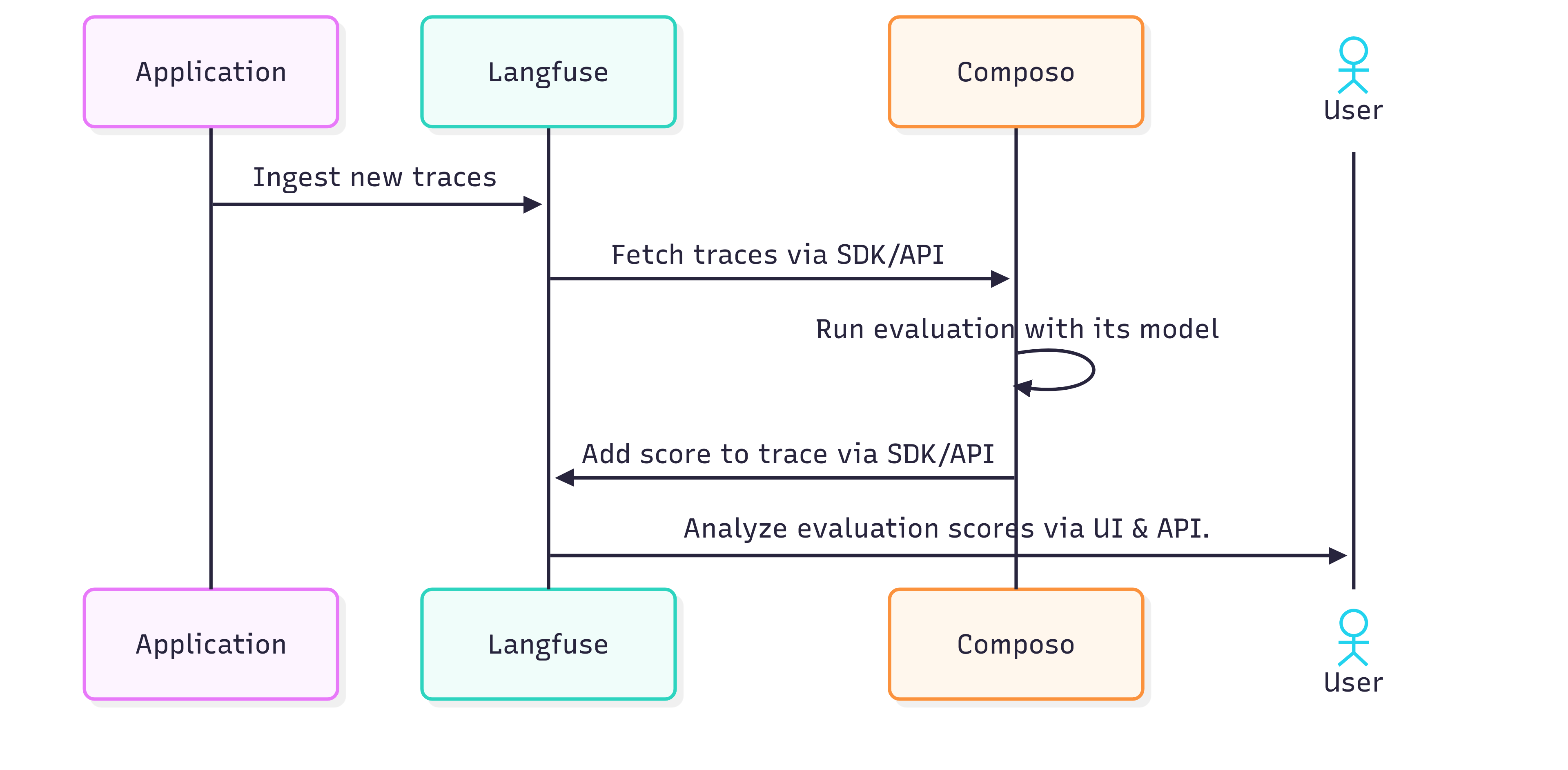
Method 1: Real-time Trace Evaluation
Evaluate LLM outputs as they’re generated in production or development. This approach uses the @observe decorator to automatically trace your LLM calls, then evaluates them with Composo asynchronously.
More detail on how the langfuse @observe decorator works is here.
When to use
- Production monitoring with real-time quality scores
- Development iteration with immediate feedback
Implementation
import asyncio
from langfuse import get_client, observe
from anthropic import Anthropic
from composo import AsyncComposo
# Initialize async Composo client
async_composo = AsyncComposo()
@observe()
async def llm_call(input_data: str) -> str:
# LLM call with async evaluation using @observe decorator
model_name = "claude-sonnet-4-20250514"
anthropic = Anthropic()
resp = anthropic.messages.create(
model=model_name,
max_tokens=100,
messages=[{"role": "user", "content": input_data}],
)
output = resp.content[0].text.strip()
# Get trace ID for scoring
trace_id = get_client().get_current_trace_id()
evaluation_criteria = "Reward responses that are helpful"
# Start asynchronous evaluation task (non-blocking)
# Note: You can register tasks to a task queue or background tasks
await evaluate_with_composo(trace_id, input_data, output, evaluation_criteria)
return output
async def evaluate_with_composo(trace_id, input_data, output, evaluation_criteria):
# Evaluate LLM output with Composo and score in Langfuse
# Composo expects a list of chat messages
messages = [
{"role": "user", "content": input_data},
{"role": "assistant", "content": output},
]
eval_resp = await async_composo.evaluate(
messages=messages,
criteria=evaluation_criteria
)
# Score the trace in Langfuse
langfuse = get_client()
langfuse.create_score(
trace_id=trace_id,
name=evaluation_criteria,
value=eval_resp.score,
comment=eval_resp.explanation,
)
Then in your main application:
# Simply call the function - Langfuse logs and Composo evaluates asynchronously
await llm_call(input_data)
Method 2: Dataset Evaluation
Use this method to evaluate your LLM application on a dataset that already exists in Langfuse. The item.run() context manager automatically links execution traces to dataset items.
For more detail on how this works from Langfuse please see here.
When to use
- Testing prompt or model changes on existing Langfuse datasets
- Running experiments that you want to track in Langfuse UI
- Creating new dataset runs for comparison
- Regression testing with immediate Langfuse visibility
Implementation
from langfuse import get_client
from anthropic import Anthropic
from composo import Composo
# Initialize Composo client
composo = Composo()
def llm_call(question: str, item_id: str, run_name: str):
#Encapsulates the LLM call and appends input/output data to trace
model_name = "claude-sonnet-4-20250514"
with get_client().start_as_current_generation(
name=run_name,
input={"question": question},
metadata={"item_id": item_id},
model=model_name,
) as generation:
anthropic = Anthropic()
resp = anthropic.messages.create(
model=model_name,
max_tokens=100,
messages=[{"role": "user", "content": f"Question: {question}"}],
)
answer = resp.content[0].text.strip()
generation.update_trace(
input={"question": question},
output={"answer": answer},
)
return answer
def run_dataset_evaluation(dataset_name: str, run_name: str, evaluation_criteria: str):
#Run evaluation on a Langfuse dataset using Composo
langfuse = get_client()
dataset = langfuse.get_dataset(name=dataset_name)
for item in dataset.items:
print(f"Running evaluation for item: {item.id}")
# item.run() automatically links the trace to the dataset item
with item.run(run_name=run_name) as root_span:
# Generate answer
generated_answer = llm_call(
question=item.input,
item_id=item.id,
run_name=run_name,
)
print(f"Item {item.id} processed. Trace ID: {root_span.trace_id}")
# Evaluate with Composo
messages = [
{"role": "user", "content": f"Question: {item.input}"},
{"role": "assistant", "content": generated_answer},
]
eval_resp = composo.evaluate(
messages=messages,
criteria=evaluation_criteria
)
# Score the trace
root_span.score_trace(
name=evaluation_criteria,
value=eval_resp.score,
comment=eval_resp.explanation,
)
# Ensure all data is sent to Langfuse
langfuse.flush()
# Example usage
if __name__ == "__main__":
run_dataset_evaluation(
dataset_name="your-dataset-name",
run_name="evaluation-run-1",
evaluation_criteria="Reward responses that are accurate and helpful"
)
Method 3: Evaluating New Datasets
Use this method to evaluate datasets that don’t yet exist in Langfuse. You can create your own dataset locally, evaluate it with Composo, and log both the traces and evaluation scores to Langfuse for UI interpretation.
When to use
- Evaluating new datasets before uploading to Langfuse
- Quick experimentation with custom datasets
- Batch evaluation of local test cases
- Creating baseline evaluations for new use cases
Implementation
Please see this notebook for the implementation approach for this.
Method Selection Recap
- Use Method 1 for real-time production monitoring
- Use Method 2 for evaluating existing Langfuse datasets
- Use Method 3 for evaluating new datasets that don’t yet exist in Langfuse
Resources
Next Steps
- Start with Method 1 for immediate feedback during development
- Use Method 2 to run experiments on datasets in Langfuse
- Apply Method 3 to evaluate new datasets before uploading to Langfuse
Ready to get started? Sign up for Composo to get your API key and begin evaluating with confidence.